Showing posts with label WAHM. Show all posts

Friday, April 18, 2008

Quick and Easy Search

After watching a friend painfully scroll through 1,000 messages in her inbox trying to find one from the right sender, it occurred to me that a lot of people don't realize how easily you can use the keyboard to find a message in a sorted list, or how easy these lists are to sort.

Almost any list control in Windows will let you type the first couple of letters in order to focus the selection on the item that matches in the current column. It's not exactly a new technique, but judging from that experience I felt it was worth sharing.


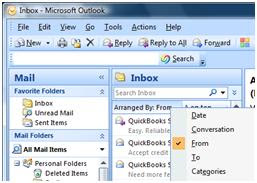
For instance, in Outlook 2007 you can sort by the "Arranged By:" header by clicking on it…

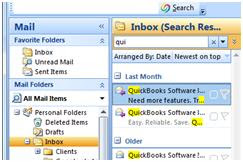
Normally, Outlook sorts by date received. You can leave the sorting by date and still quickly find your e-mail by typing the first couple of letters in the Search box.


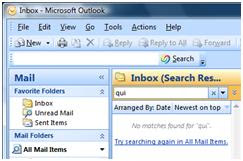
Suppose you have already filed the e-mail in a folder. Obviously the search won't find it because it's looking through your Inbox only. Just select "Try searching again an All Mail Items".


I know so many people that are given this tool at work and told "just use it for e-mail". They are never taught about the little tricks and all the powerful tools that can make their lives so much easier and more productive. For all of you that were thrown to the wolves out there, I hope these tips and tricks help.

Saturday, March 29, 2008

Are You Joining Earth Hour?

For one hour this Saturday night nearly 200 cities around the world, will go dark in what the World Wildlife Fund (WWF) is calling the largest planned power outage in history. This event is an effort to raise awareness about power consumption and climate change.

More than 2.2 million people participated in the inaugural Earth Hour last year, in which just one city – Sydney, Australia – went dark. The one hour outage produced a 10 percent drop in energy usage during the hour – double what had been predicted.

On March 29, 2008 at 8 p.m., join millions of people around the world in making a statement about climate change by turning off your lights for Earth Hour.

In the United States, we are a “throwaway society”. Because of the great economy we have experienced in the past, it was just easier to throw things away and buy new. This mentality applies to energy as well, and we don’t think twice about hopping in the car to drive to the store down the street. We are paying for this lifestyle now, though, with global warming and reduced natural resources. Unfortunately, it’s hard to change habits that have formed over a lifetime, and I find most people “allergic” to change. Two things that will go a long way towards changing this mentality is the fact that global warming can no longer be called a dooms-day prediction by hysterical scientists, and the very real recession we are facing in the United States.

Facebook has this new Facebook Footprint Calculator that I thought was very informative. If you’re not on Facebook, there’s also a One Minute Calculator. While this calculator is very general, and you may be instituting different things in your home and workplace to reduce your footprint, it is a real eye opener for people who have no clue how their daily living impacts our environment. To get even more detailed try this calculator, this drills right down to what state you live in.

According to the Facebook calculator, by becoming a Virtual Assistant, I reduced my carbon footprint from 23.08 to 7.21 tons per year – Wow! According to the more detailed calculator, my footprint is only 1.8 tons per year. The national average is 7.5 tons per year, and while I feel that I can do more to make a difference, I think it’s a good start.

The only difference that this calculator could determine was the driving. I used to drive 100 miles a day (at minimum) to get to work. I now work at home and reduce my footprint even more, since being a business owner I get to determine the standards and policies to implement. I use recycled paper, but in today’s technological world, I don’t have very many things I actually have to print. I use compact fluorescent lights in my office, and am in the process of changing my home lighting. I turn off the computer, printer, calculator, lights, etc. when I leave the office.
For those of you who are not aware of this term, a Virtual Assistant (VA) is a highly-trained independent entrepreneur who provides a myriad of business support services virtually via phone, fax and internet based technology to support and meet the growing needs of businesses worldwide. *Source:
Virtual Assistant Networking Association (VANA)

A few examples of lowering your carbon footprint in your home are:

  • Switch to compact fluorescent light bulbs to save money and reduce emissions. Lighting accounts for around 5% of household greenhouse gas emissions, and compact fluros use 75% less energy than an equivalent incandescent bulb. Although the bulbs cost more up-front, you will actually save money through the energy saved and extended life of the bulb.
  • Turn appliances off while not in use. Unplug any appliances like mobile phone chargers, TVs, microwaves, MP3 players, which are not being used and are on standby. Appliances on standby consume up to 10% of your electricity bill.
  • Turn off anything that doesn’t need to be on. A good rule is to turn off anything not being used. When you leave a room or leave the house, turn off your lights or appliances like the TV or computer.
  • Use less hot water. This is not only a good water saving tip, it saves electricity too. Spend one minute less in the shower.


At work:

  • Get off standby. Speak to your office manager about turning off any equipment at work that is not being used, including computer screens, photocopiers and printers, particularly when you leave at night.
  • Turn off lights at the end of the working day. Before you leave your place of work remember to turn off any lights in your workspace and your computer if you use one at work. Remember to unplug your mobile phone or laptop charger when it’s not in use. Speak to your office manager about installing motion-sensor lighting after 5pm when most people have gone home.
  • Find out what’s happening in your workplace. Ask about your company’s emissions reduction policies and find out what’s already happening. Look for ways to reduce energy use in your workplace and encourage improvements. If employers know their employees are keen to make their workplaces environmentally friendly, they’ll be even more inclined to take action.
  • Encourage your organization to have measurable emissions reduction targets. Many businesses are committing to emissions targets and have plans to be carbon neutral by a certain date. Switching to green power, reducing and offsetting energy use and travel, and incorporating this into all areas of the business are critical to this process. Does your company have a plan?

Many companies are turning to more flexible schedules, allowing employees to work from home, and outsourcing some of the daily routine tasks. One huge retailer that I used to work for is actually making great strides in becoming “green”. That didn’t stop me from laughing 15 years ago when they announced to the staff that they were “going paperless”. For this company, which meant instead of using 10 reams of paper for daily reports, we only had to use 7 reams – per store. At the time, they had about 3,000 stores – you do the math. I do have to say, they keep plugging away and trying to lower their carbon footprint in different ways daily.

How will becoming more flexible with scheduling or outsourcing some of your administrative needs lower your carbon footprint? It’s worth thinking about.

Pat Zappavigna is the owner of Instant Office Assistant, an administrative support services company. You can contact Pat at pazappa@verizon.net or through the website www.InstantOfficeAssistant.com.

Saturday, March 1, 2008

Guide to Using Check Disk in Vista

Anytime somebody has hard drive errors, I always recommend that they run chkdsk… what geek wouldn't? When howtogeek.com realized that there's no guide to using check disk, he decided to write one. I thought it was worth sharing, since no small business or entrepreneur can afford to have computer problems stop them. Here's his tutorial in full.

The chkdsk or "Check Disk" utility is used in Windows to scan through your entire hard drive and find problems… it's a lot like doing inventory… it's boring, but it has to be done sometimes. I recommend that you run through a check disk every month or two.

Using CheckDisk the GUI Way
Open up Computer and then right-click on the drive you want to check, and choose Properties.


Then select the Tools tab, and click the "Check Now" button.


A little dialog will pop up to allow you to choose the options you want for the disk check. You should check both options if you want to really check the disk properly, but if you just want to do a quick check you could select only the first one.


The only problem with that is that Windows can't check a drive that's being used, such as the system drive, but Windows will let you schedule a disk check for the next reboot.


You should keep in mind that running through a full check disk takes quite a while, sometimes hours depending on how big the drive is and how many files you have.

Pat Zappavigna is the owner of Instant Office Assistant, an administrative support services company. You can contact Pat at pazappa@verizon.net or through the website. Instant Office Assistant

Thursday, February 28, 2008

E-mail Courtesy

A friend who is a computer expert received the following directly from a system administrator for a corporate system. It is an excellent message that ABSOLUTELY applies to ALL of us who send e-mails. Please read the short letter below, even if you're sure you already follow proper procedures.

Do you really know how to forward e-mails? 50% of us do; 50% DO NOT.

Do you wonder why you get viruses or junk mail? Do you hate it? Every time you forward an e-mail there is information left over from the people who got the message before you, namely their e-mail addresses and names. As the messages get forwarded along, the list of addresses builds, and builds, and builds, and all it takes is for some poor sap to get a virus, and his or her computer can send that virus to every E-mail address that has come across his computer. Or, someone can take all of those addresses and sell them or send junk mail to them in the hopes that you will go to the site and he will make five cents for each hit. That's right, all of that inconvenience over a nickel! How do you stop it? Well, there are several easy steps.
Try the following if you haven't done it before:

(1) When you forward an e-mail, DELETE all of the other addresses that appear in the body of the message (at the top). That's right, DELETE them. Highlight them and delete them, backspace them, cut them, whatever it is you know how to do. It only takes a second. You MUST click the "Forward" button first and then you will have full editing capabilities against the body and headers of the message. If you don't click on "Forward" first, you won't be able to edit the message at all.

(2) Whenever you send an e-mail to more than one person, do NOT use the To: or Cc: fields for adding e-mail addresses. Always use the BCC:(blind carbon copy) field for listing the e-mail addresses. This is the way the people you send to will only see their own e-mail address. If you don't see your BCC: option click on where it says To: and your address list will appear. Highlight the address and choose BCC: and that's it, it's that easy. When you send to BCC: your message will automatically say "Undisclosed Recipients in the "TO:" field of the people who receive it.

(3) Remove any "FW :" in the subject line. You can re-name the subject if you wish or even fix spelling.

(4) ALWAYS hit your Forward button from the actual e-mail you are reading .. Ever get those e-mails that you have to open 10 pages to read the one page with the information on it? By Forwarding from the actual page you wish someone to view, you stop them from having to open many e-mails just to see what you sent.

(5) Have you ever gotten an email that is a petition? It states a position and asks you to add your name and address and to forward it to 10 or 15 people or your entire address book. The email can be forwarded on and on and can collect thousands of names and email addresses. A FACT: The completed petition is actually worth a couple of bucks to a professional spammer because of the wealth of valid names and email addresses contained therein. DO NOT put your email address on any petition. If you want to support the petition, send it as your own personal letter to the intended recipient. Your position may carry more weight as a personal letter than a laundry list of names and email address on a petition. (And don't believe the ones that say that the email is being traced, it just ain't so!)

Some of the other emails to delete and not forward are:

1. The one that says something like, "Send this email to 10 people and you'll see something great run across your screen." Or sometimes they'll just tease you by saying 'something really cute will happen.' IT AIN'T GONNA HAPPEN!!!!! (We are still seeing some of the same emails that we waited on 10 years ago!)

2. I don't let the bad luck ones scare me either, they get trashed.

3. Before you forward an 'Amber Alert' , or a 'Virus Alert', or some of the other emails floating around nowadays, check them out before you forward them. Most of them are junk mail that's been circling the net for YEARS! Just about everything you receive in an email that is in question can be checked out a Snopes. Just go to www.snopes.com < http://www.snopes.com/> . or www.truthorfiction.com < http://www.truthorfiction.com/> It's really easy to find out if it's real or not. If it's not, please don't pass it on.

So please, in the future, let's stop the junk mail and the viruses. Sorry this post is so long, but I thought all the information was important. As a virtual assistant, I live by e-mail. I always think that I'm utilizing it correctly, but it never hurts to view a reminder now and then.

Pat Zappavigna is the owner of Instant Office Assistant, an administrative support services company. You can contact Pat at pazappa@verizon.net or through the website. www.instantofficeassistant.com


Thursday, February 21, 2008

Backup Plan

Do you have a backup plan? I don’t mean backing up your data on your computer, although that’s extremely important for any business. I mean in case you are sick or hurt – what’s going to happen with your business? Who’s going to take care of your clients?

This issue rushed up to greet me this weekend when I broke my arm – my right arm no less! As new small business owner, I have no employees, but still have clients and commitments. I had no idea if I would be able to pull off my existing tasks, much less try to take on new clients that were finally responding to my marketing efforts. Do I stop marketing and lose the momentum I have gained through months of hard work? Do I take on new clients and hope I can handle it? Would that be a disservice to my clients? These questions were swirling through my mind all week.

Luckily, I chose the perfect business! Or it chose me. I’m still not sure. As a virtual assistant and a member of Virtual Assistant Networking Association (VANA), I have people! I love that line because it sums up my experience with this wonderful network. You have a question? There are over 7,500 very talented and experienced people in this network who rush to help you get an answer. I have never experienced anything like it in my 30 years in corporate America. The motto at VANA is “Remember, no question is ever stupid; stupidity comes from not asking when you have the opportunity (VAnetworking Forum) to do so.”

For those of you who have not heard of this fast growing industry, a Virtual Assistant (VA) is a business owner who works from their own office providing professional support, services and skills to their clients via phone, fax and internet based technology.

I had backup available and did not realize that until I actually needed it. Not every small business owner has that cushion. How many businesses do you know that can call their competitor and say “hey, can you help me out with this client?” What a relief to know that I can continue to grow my business and still assist my clients to take their business to the next level with the assistance of many qualified VA’s.

As it turns out, I was able to complete all my commitments this week, including my volunteer work for Habitat for Humanity. No, I don’t build the houses – my family would laugh at that one. I provide VA services – contact management and Desktop Publishing services.

You can rest assured, though, that my backup plan is being formalized this week. I don’t ever want to be in a position where my clients could experience inconvenience, or even revenue loss, because I can’t fulfill my obligations. I urge all small business owners to put a Backup Plan on their agenda immediately. No time? Let a VA help you with it!

Pat Zappavigna is the owner of Instant Office Assistant, an administrative support services company. You can contact Pat at pazappa@verizon.net or through the website. www.instantofficeassistant.com

Saturday, February 16, 2008

Friday Night Date at the ER

Friday was exceptionally busy for me. As a virtual assistant that’s not always the norm. As a solo entrepreneur, you have ups and downs and your work load fluctuates. That day happened to be very productive and I had a lot of different things going on. A possible new client, some volunteer work, preparations for a trade show that I thought would be extremely helpful for my business, not to mention regular routine household chores. Maybe I was tired or maybe just not paying attention.

I was still excited over the developments throughout the day when I went to bed. My dog, a large German Shepherd mix came over for a pet and I thought nothing of leaning over the side of the bed to scratch his back … this was a normal nightly routine. The only problem was he changed the routine. Just as I went to pet him, he moved away—but I didn’t. I wound up petting the floor with a karate chop. I heard the bone in my arm snap, but I guess I was a little shocked. I just sat on the floor a minute (where my body had followed my arm), and wondered “what do I do now?”

So here it is, Friday night or early Saturday morning (I’ m a little hazy on the time), and my husband is driving me to the local emergency room with my arm packed in ice. My friend Gloria thinks I’m nuts because I made my husband help me get dressed – I was not going out in my PJs. Now, I don’t know about you, but I dread having to go to the ER on a weekend – it is always packed and short staffed, it seems. The good thing is, our ER is only 5 minutes away (I have 2 sons and could get there blindfolded). Luck was with us that night – not many people got hurt. I guess the moon wasn’t full. I didn’t even have to sit in the waiting room. My husband and I looked at each other and he said “well, this should be quick” – ha! We waited in the cubicle instead!

At about 1:30 they finally sent me for x-rays. The tech was great – very careful about moving my arm and a great sense of humor. When I am scared or upset, I always turn everything into a joke and she went right along with it. I wonder if a lot of people do that? The doctor finally came back to tell us that the arm was broken in two spots (already knew that from the tech – she let me see the pictures on the screen) and the nurse proceeded to splint my arm. They won’t put a cast on anymore in my ER until you see an orthopedic surgeon. Find a surgeon on a weekend – I think not!

So, here I sit on Saturday evening with this stupid splint on my arm wondering what’s going to happen with my fledgling business. As I said earlier, I’m a small business owner – I have no employees – it’s just me. And I don’t think I mentioned this part – I broke my right arm and I’m right-handed. As a virtual assistant, ALL of my work is done on a computer keyboard. Not to mention the fact that I can’t even dress myself yet. I feel like a baby learning to do things all over again.

Well, I’m sitting here now typing. Granted, it’s one-handed and very slow, but I think I can do this. This is the very same attitude that got me into this business in the first place!